
WhatsApp campaigns: send bulk messages without getting banned
Personalization, sending pace, clean lists: the rules for effective WhatsApp campaigns that don’t put your number at risk.
Sending the same message to 500 customers on WhatsApp is tempting. Copy-pasting it 500 times is impossible. And using a poorly configured tool can get your number blocked. A good WhatsApp campaign relies on three things: a list of people who know you, personalized messages and a human sending pace.
Why numbers get blocked
WhatsApp protects its users against spam. A number is most often restricted when:
- many recipients report or block it;
- it sends hundreds of identical messages within minutes;
- it massively messages strangers who never saved it;
- it’s brand new and already sending large volumes.
The good news: all these risks can be managed.
6 rules for a successful WhatsApp campaign
1. A list that knows you
Customers, leads who messaged you, members of your groups, people who left their number on your site: they’re the ones who open and reply. Organize them with tags to target (“VIP”, “Lagos”, “bought in October”).
2. A message with their first name
“Hi {prenom}” changes everything. With Whatixo, any column from your file (first name, city, product bought) can be inserted into the message.
3. Text variants
Alternate greetings (“Hi”, “Hello”, “Good evening”) so messages aren’t all identical.
4. A human pace
Whatixo automatically spaces sends with variable delays and pauses, like a person would. You launch the campaign, it runs at its own pace.
5. Real value for the customer
An exclusive offer, a new arrival, a useful reminder. A message that brings something is rarely reported.
6. An easy way out
Offer to reply “STOP” to stop receiving your messages, and respect that choice.
Create a campaign in Whatixo
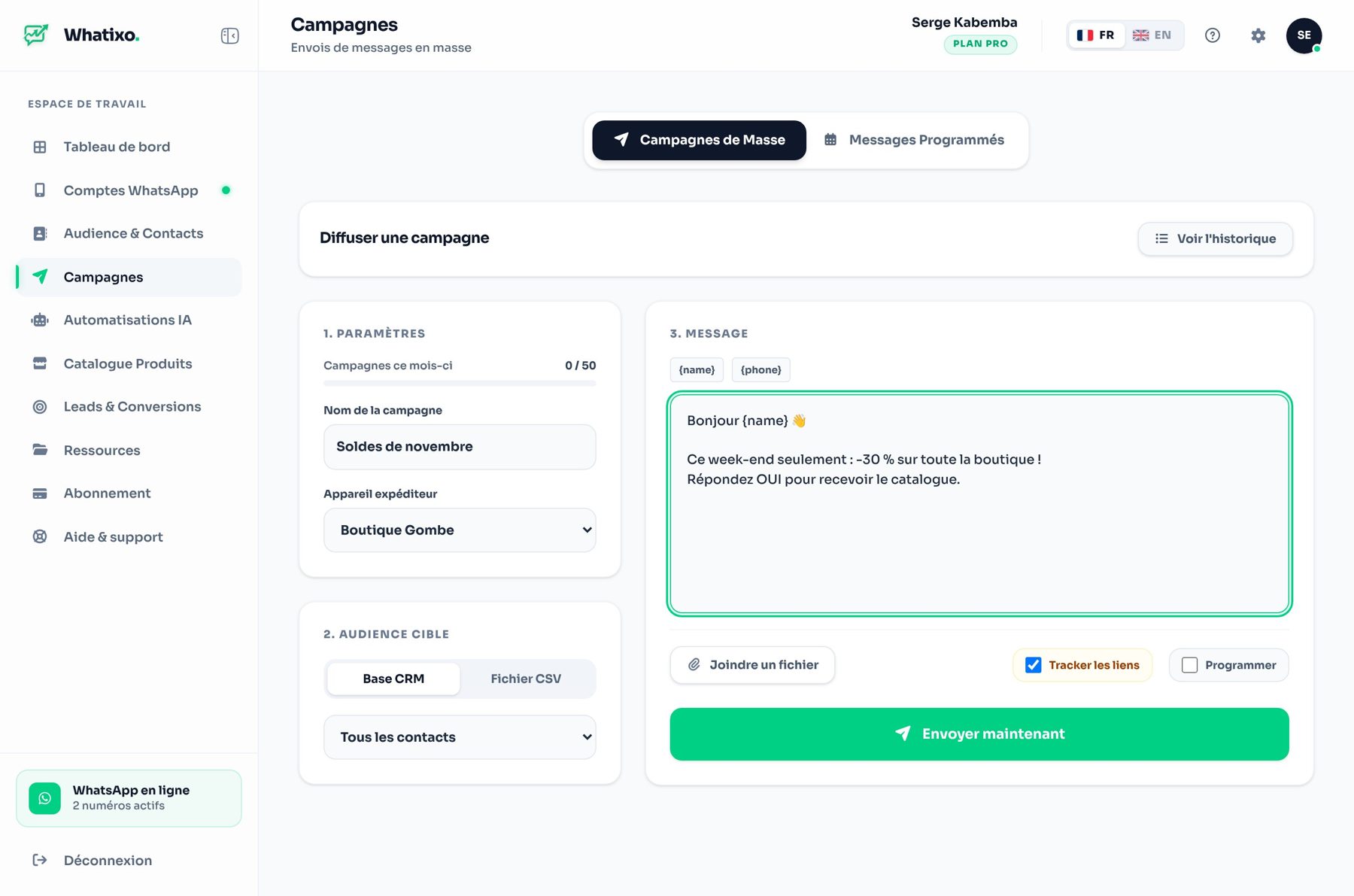
- Choose your recipients: a CRM tag or an Excel / CSV file.
- Write the message with your variables, add an image, a video or a PDF.
- Send now or schedule the day and time.
- Track live: sent, read, clicks on your links.
Example: “Hi {prenom} 👋 To thank you for your loyalty, 15% off the whole store until Sunday with code THANKS15. Reply STOP to stop receiving our offers.”
After sending: turn replies into sales
A campaign generates replies, sometimes many at once. That’s where the AI agent takes over: it answers questions about the offer while you process orders. And for those who read without replying, a follow-up sequence can check in two days later.
Campaigns from WhatsApp Web with the Chrome extension
Prefer working in WhatsApp Web? The Whatixo Chrome extension also lets you import a file and send a personalized campaign right from your browser.
Try Whatixo for free → No credit card required, your WhatsApp is connected in 30 seconds.