
How to automate WhatsApp to sell more: the complete 2026 guide
AI agent, campaigns, follow-ups, CRM and a connected store: the step-by-step method to turn your WhatsApp into a sales machine.
Your customers message you on WhatsApp at all hours. They ask for a price, availability, a delivery time… and when the answer comes three hours later, they have often already bought elsewhere. Automating WhatsApp is not about replacing your relationship with customers: it’s about never leaving them without an answer again.
In this guide, you’ll see how to automate every step of selling on WhatsApp: answering questions, sending offers, following up with leads, confirming orders and organizing your contacts.
Why automate WhatsApp to sell?
WhatsApp has more than 2 billion users worldwide, and in many countries it’s the first place customers contact a shop. But one phone, one person and dozens of conversations a day doesn’t scale. The problems are always the same:
- repetitive questions (“how much is it?”, “where do you deliver?”) that eat all your time;
- messages received at night or on weekends that go unanswered;
- interested leads you forget to follow up with;
- numbers written down anywhere, with no history or tracking.
Automation fixes all four at once, from your own WhatsApp number.
Step 1: connect your WhatsApp number
With Whatixo, you connect through WhatsApp’s official “Linked devices” feature, just like WhatsApp Web: scan a QR code or enter an 8-character code. Your phone keeps working normally and you keep your history. It works with WhatsApp and WhatsApp Business.
Step 2: let an AI agent answer questions
The AI agent replies for you, with your tone, your prices and your documents (PDF catalog, delivery terms, FAQ). It understands questions phrased a thousand different ways, can qualify a lead and hands over to a human when it doesn’t know. Every customer gets an answer within seconds, even at 2 a.m.
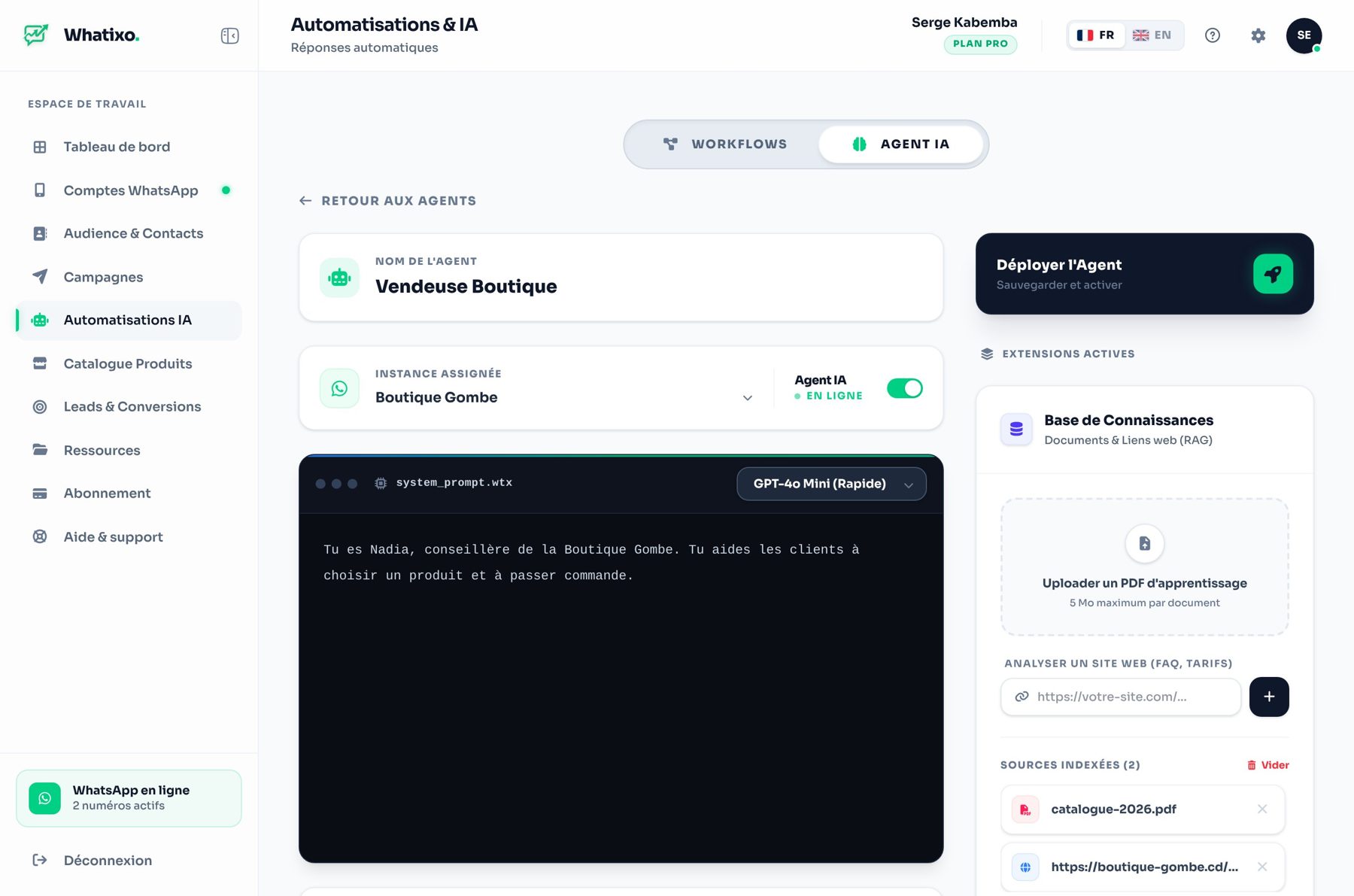
To go further, read our dedicated guide: a WhatsApp AI agent that replies to your customers 24/7.
Step 3: send personalized campaigns
A promotion, a new arrival, an event: with campaigns, each contact receives a message with their first name, plus an image, a video or a document. You schedule the send, Whatixo spaces messages out at a human pace, and you track reads and clicks.
Example: a clothing store sends “Hi {prenom}, the new collection is here 👗” on Friday morning to customers tagged “VIP”. Replies land straight in WhatsApp, where the AI agent or the team takes over.
Step 4: follow up with leads automatically
Most sales don’t happen on the first message. A follow-up sequence automatically sends the right message at the right time: a welcome the same day, a check-in two days later, an offer after a week. It starts as soon as a contact gets a tag and stops when they buy.
Step 5: connect your store and your tools
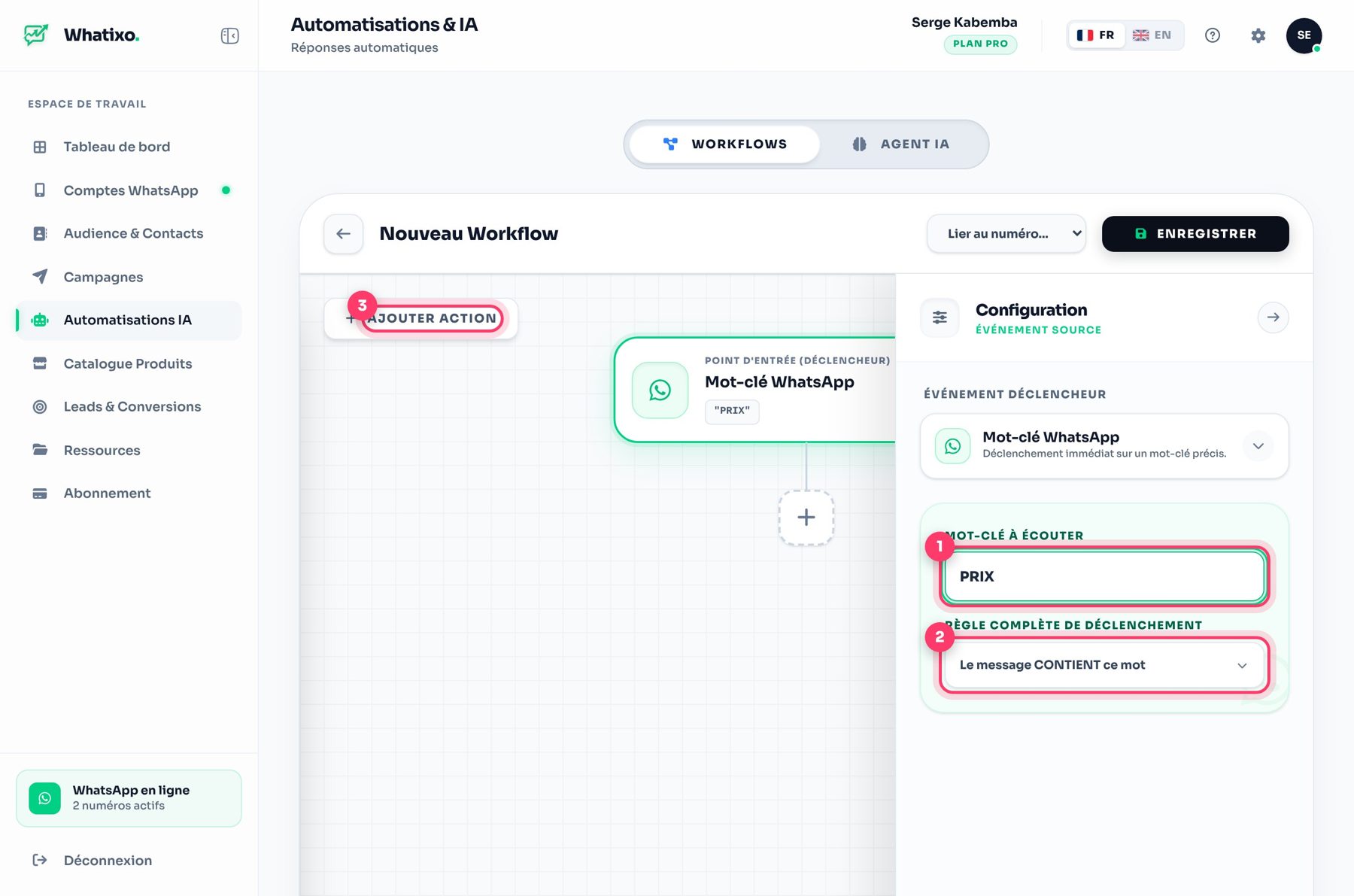
Workflows react to events: a new Shopify or WooCommerce order, a keyword sent by a customer, a click, a form. They then trigger the right action: WhatsApp message, SMS, email, tag, delay, condition… without writing a single line of code. Chariow, Maketou, Zapier, Make, n8n and any website via webhook or API are supported too.
Step 6: keep every customer in a CRM
Everyone who messages you is added to the CRM with their history. You organize contacts with tags, import your Excel files, extract members from your groups and track each lead’s “temperature” (cold, warm, hot).
What if your customers don’t read WhatsApp?
Some customers prefer email, others don’t always have internet access. Whatixo also lets you send SMS campaigns with your own provider and emails from your business address, with the same CRM and the same automations.
Best practices to protect your number
- Message people who know you or gave you their number.
- Personalize your messages (first name, text variants).
- Increase volumes gradually with a new number.
- Always offer a way to stop receiving your messages.
Where to start?
Start small: connect your number, turn on the AI agent with your 10 most frequent questions, then create a first welcome sequence. Within an hour, your WhatsApp is already working for you. Plans are listed on the pricing page, and a free plan lets you try everything.
Try Whatixo for free → No credit card required, your WhatsApp is connected in 30 seconds.